LINGA — Feature Request Forum

Print chit for Gift Card check balance
Would like to be able to print a chit when you check Gift Card balance. Potentially also when you sell a gift card as sometimes you may want to sell multiple gift cards in one transaction.

Allow us to see who is clocked in from the store dashboard
This can be under the employees tab on the dashboard. This way accounting will not need to reference other sources. This will save us a lot of time and effort if we are able to see that the reason we are over labor is because a trainee is clocked in rather than being overstaffed. It would also be nice to display their employment status(ie. Trainee, Barista, Manager) so that Accounting can factor that as well.

Unselect to Reselect a Modifier
When selecting mods under the mod ribbon it’s nice to go back to a previous mod group and make a change.
Ideally we would be able to return to the mod heading, touch the previously selected mod to “unselect” and then select the desired mod.
Allow copy/paste of hex codes
Hello, Linga team.
I often work with clients who wish for their POS buttons to be specific colors, for easier recognition especially if they have a lot of items for sale.
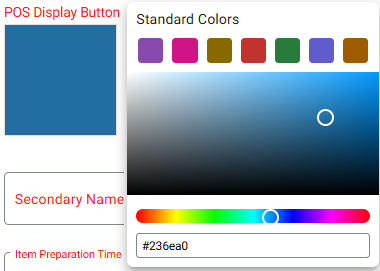
I believe allowing us to copy and paste hex codes into the color selection screen would be of great help and not too difficult to achieve. Currently, we can see the hex codes but can't select or change them manually (as pictured below).
Thank you for your time and hope you can consider this idea.
Sofia

Rounding up total
The US is stopping the production of the $0.01, we will no longer be able to give out the exact change when collecting cash. Linga needs to be able to round up the total to the nearest 5 or 0.
$0.01 and $0.02 rounds down to 0.00
$0.02 and $0.04 rounds up to $0.05
$0.06 and $0.07 rounds down to $0.05
$0.08 and $0.09 rounds up to $1.00
Many other POS have this function already.

Allow the Master Stock Report to be Sorted by Transaction Date
The Master Stock report can be sorted by business date, but our partner has a merchant that needs this to be sorted by transaction date. Can we add a transaction date option to the Master Stock Report?


Take Off 'Tax Total' Line on Credit Card Slip
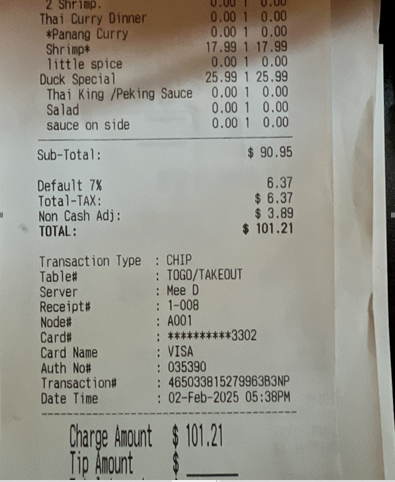
Customers at locations with only 1 tax rate are seeing the tax line and another line that says tax total, so the merchants are getting a lot of complaints from customers that think the tax is being charged twice.
Recently Linga said they would fix this with 6.0.95, to where turning off "Tax Summary" in back office front end receipt template would stop "Tax Total" line from showing. Problem is, even on 6.0.95 it still shows on the credit card slips (see example image).
EXAMPLE:
Enhancement to Inventory Count Sheets
We would like to request an enhancement to the inventory count sheets. Kindly review the possibility of adding the following columns:
- Category
- Sub-Category
- SKU Code
- Brand Name

Customer support service by UserEcho


