LINGA — Feature Request Forum

Ability to bump/clear individual items from the KDS ticket
Request is to be able clear an individual item or items from a KDS without bumping the entire order. Given the small FONT size of the order the Completed check mark is very small and a color change doesn't necessarily help work flow.
Use: 4 items fire back to the kitchen, 3 are long time cook and 1 is a quick item that needs to go right away. Employee can clear that item off the screen leaving only the items still being needed and without tying up screen space.
Or at a minimum be able to strike through the item while leaving it on the KDS. At least that is a stronger visual indicator.
Thank you

We do have this option available with KDS to KDS Broadcast feature, please call customer support to get more details.
Enable descriptions at the Category or Sub Category level, not just item level.
Need the ability to add group level descriptions. Examples - "All Entree's include choice of soup or salad plus 1 side" or "
All tacos served with shredded cabbage, oaxca cheese, chopped onion, and cilantro", etc. The goal is to give the customer as much information as possible without having to repeat for all items within that same group/category. This would be applicable to both Kiosk and OLO where a picture and description can sell an item (or not).

allow for same day future order but not next day
I would like to be able to allow guest to order online for same day future ordering but not for the next day

modifier kitchen print name
Just like menu items, where you have the name of the menu item and then the Kitchen Print Name, the same thing needs to be available for Modifiers. The Modifier Name and then the Modifier Kitchen Print Name.

Auto Gratuity
The gratuity will automatically be added to the check if the check has more than (X) number of people.
- Create the gratuity and its settings
- Turn on the auto gratuity feature
Customer wants to be able to 86 modifiers!
This is very important for building a bowl. If they are out of " mango" or "cucumber" for Poke Bowls that day, they want to 86 the modifier in OLO & in POS.

Name Checks after splitting check.
When splitting checks, if the check is named it would be a major improvement if the subsequent checks caused by the split would have something other than the default Walkin name. For example, if a check is named Jason and you split it 3 ways, have it name the others "Jason (2)" and "Jason (3)". Currently if there are any other tabs not named, its a pain to sift through and try to find your checks based on the items they ordered.

Option to Disable/Modify OLO Tip
OLO Tip Settings

We should have the ability to do the following from the Web Order admin page:
- Disable the tip line from appearing if the store does not accept tips
- Enabled/Disable tips based on order type.
- IE: Tip options present on Delivery, but not on Pickup.
- IE: Tip options present on Delivery, but not on Pickup.
- Configure the pre-defined tip %.
All of the above should be a store setting instead of an account setting. Allowing individual stores in a franchise to customize this information.
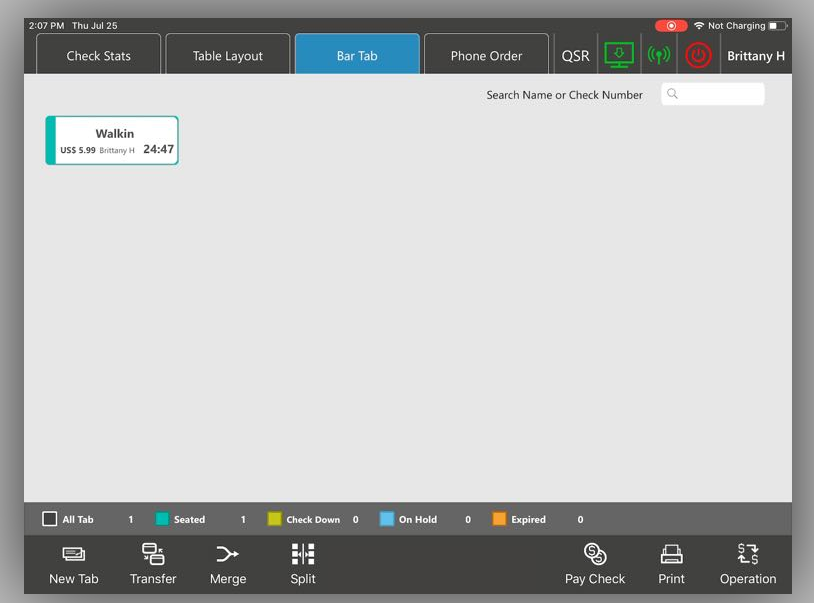
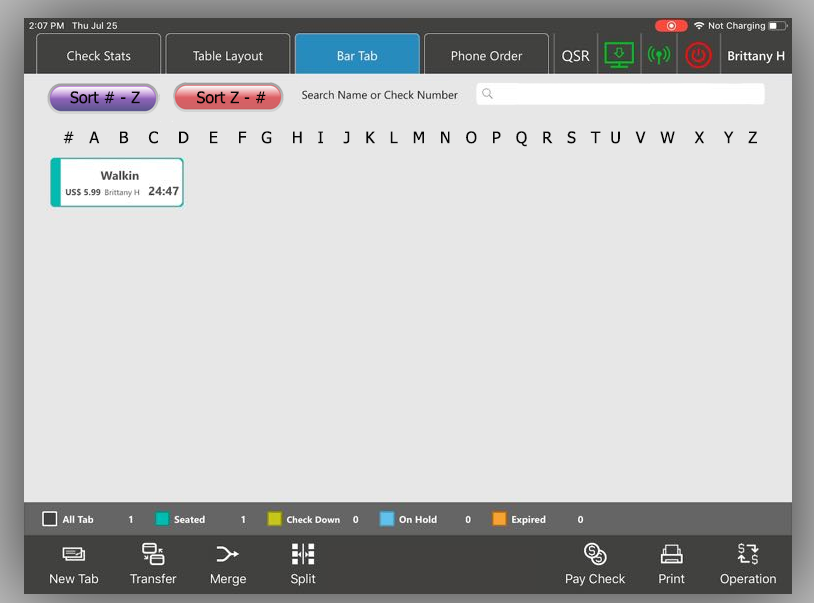
Bar Tab Screen Search Options
Bar Tab Screen:
Searching options to add to this screen, such as:
- Alphabet Letters (Customer can select a character and see only Tabs starting with that character)
- Expand the Search Bar: (Makes the Search Bar longer and fills more of the screen)
- Sort # - Z (Customer can select this button and it sorts the tab from #’s to Z)
- Sort Z - # (Customer can select this button and it sorts the tab from Z to #’s)
Original:
Updated with Search Options:
Show Weight Sold for Scale Items on Item Sales Report
Instead of showing the amount of times a scale item was shown, the item sales report should show the weight sold instead.
Customer support service by UserEcho


