LINGA — Feature Request Forum

tech support license
There should be a tech temporary license that we can use to log into our iPad to see their POS that we are working on. Just have it time out in like an hour. Even when I need help on my build tech support has to steal one of my licenses to test out what I am seeing.

Training Mode
Have the ability to put the system in training mode and train employees/staff, they also can print tickets and receipts to see how they will look and send to the kitchen
Front of House: Adjust Time sheets on iPad
Managers will have the ability to make adjustments to times and clock ins on the ipad Front Of House

Void an item after partial payment
We would like the ability to void an item after a payment has been made on a check. Sometimes a portion of the check is paid for, but the other portion needs to be voided (not comped). Currently we're unable to do this. We would like the ability to do voids even if there is a payment on the check.

Ability to Turn Off Seat Count When Starting New Table
Would like the option to bypass the required number of seats when starting a new table. The table could default to 1 seat and the server can add seats manually if needed. A lot of our locations like to send everything in under seat 1 and split the check at the end.

This option is available in our latest iOS build 5.2(1.2). Please contact support for further assistance, if required.

The Ability to change the time and date of a future order
After you make a future order if the customer calls and wants to adjust the date and time of the order there is no way to do it. Without canceling it and redoing the order. There needs to be a way to do this.

Hide select modifiers for online ordering
Need a way to hide modifier items online. This happens quite often where you have more limitations online then what a restaurant would allow
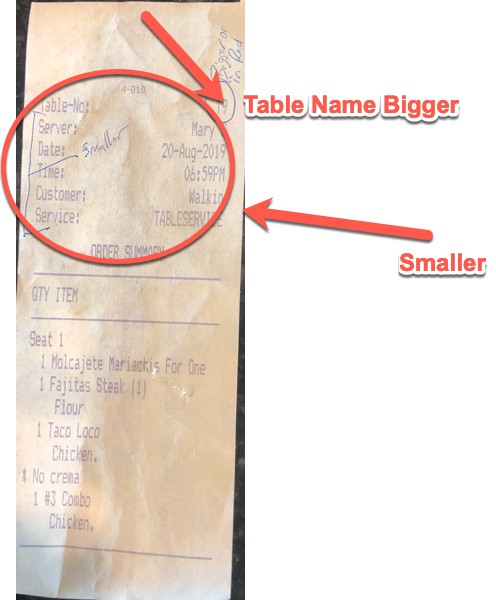
Decrease font size of top portion of kitchen receipts, Increase size table name
We have multiple customers that ask us to increase font size but then want us to decrease the font size of all the information at the top, as it uses a lot of paper. The exception here is the Table number or name. Most location want that portion of the ticket to stand out either in larger font or in red.

KITCHEN TICKETS PRINTING - "Order Summary" vs "Item Summary" (ANDROID OS)
Introduction: We have a total of 15 very high-volume Italian/pizza bar-restaurants with an average of 8 workstations per unit. We have just completed our first 9-station store conversion to Linga, but have some reservations.
Background:
Linga's Android system DOES have two sections of the ticket they have called "ORDER SUMMARY" (station-specific items only) and "ITEM SUMMARY" (all ticket items w/o modifiers) to allow Line Cooks to see the full ticket for timing, but differentiate those items that they need to be cooking.
Problem:
1) The ITEM SUMMARY items will repeat the items already listed above within the ORDER SUMMARY causing confusion among line cooks mostly, but also utilizes 25% more paper or better. This is unacceptable for high-volume full service establishments where kitchen output is directly related to the efficiency of the line...being able to read tickets from a distance and clearly, quickly decipher next-steps is mission critical.
2) The kitchen tickets' ITEM SUMMARY also includes things that are totally irrelevant, like drinks that are also directed to the remote bar service well printers. Imagine what this looks like for a party of 6 or more with appetizers and entrees...the tickets are LONG and confuse cooks with unnecessary items.
Solution:
i. A simple solution is create a logic that will not allow any items from the ORDER SUMMARY to be duplicated within the ITEM SUMMARY. Additionally, certain categories should be able to be excluded; e.g. Beer, Wine, Liquor, etc.
ii. The better solution would have been to never create that funky system in the first place, and do what every other POS does... get rid of the sections and have station-specific items in bold w/ mods, the rest of the items regular font w/o mods.
Conclusion:
EITHER of these proposed resolutions would be wonderful...whichever is faster, frankly! After 25 years in the business using Aloha, Squirrel, Toast, Micros, Rpower, SkyTab, Digital Dining, and Clover POS...frankly I was shocked to see this clunky of a solution from the founders of Benseron. It is, however, better than nothing.

Inventory Depletion for Online Ordering
Currently, Online ordering has no form of menu depletion to restrict selling products when sold out. We need the Online Ordering to sync with inventory and the 86 counts on the iPad.
The 86 system works great on the iPad but without it available & syncing to Online Ordering it does not work for certain business models.
During the Covid-19 pandemic is when this feature is needed the most.
Customer support service by UserEcho


