LINGA — Feature Request Forum

Delivery Time on All Orders
NAMSCORP requested delivery times on all receipts, not just "ASAP" orders.
Changing Delivery to Future Order
NAMSCORP has requested the capability of changing a delivery order to a future order on behalf of their merchant, Al's Pizzeria.
Ex Scenario: Employee is taking an order over the phone & the customer does not specify that the order is for a future date, not the present date. There is no way to change the current delivery order to a future order - needs to be voided & taken from the beginning.

Order type selection in Kiosk
Feature Request – Auto-Set Kiosk Order Type with Customer Display
Description:
Currently, the kiosk requires customers to actively choose between For Here and To Go. For locations that only allow one of these options, the step adds friction without value.
Requested Enhancement:
-
In Back Office, allow merchant to lock kiosk order type to either:
-
For Here only
-
To Go only
-
-
When locked, the kiosk should:
-
Skip the selection screen.
-
Display a clear banner/message at the start of the order (e.g., “This kiosk is set to For Here orders only” or “This kiosk is set to To Go orders only”).
-
Print the correct order type on the kitchen tickets and receipts.
-
Benefit:
-
Keeps customers informed about how their order will be handled.
-
Eliminates unnecessary extra step on kiosk.
-
Reduces confusion while preserving accurate reporting and routing.

Tips show unnecessary trailing zeros on the customer display
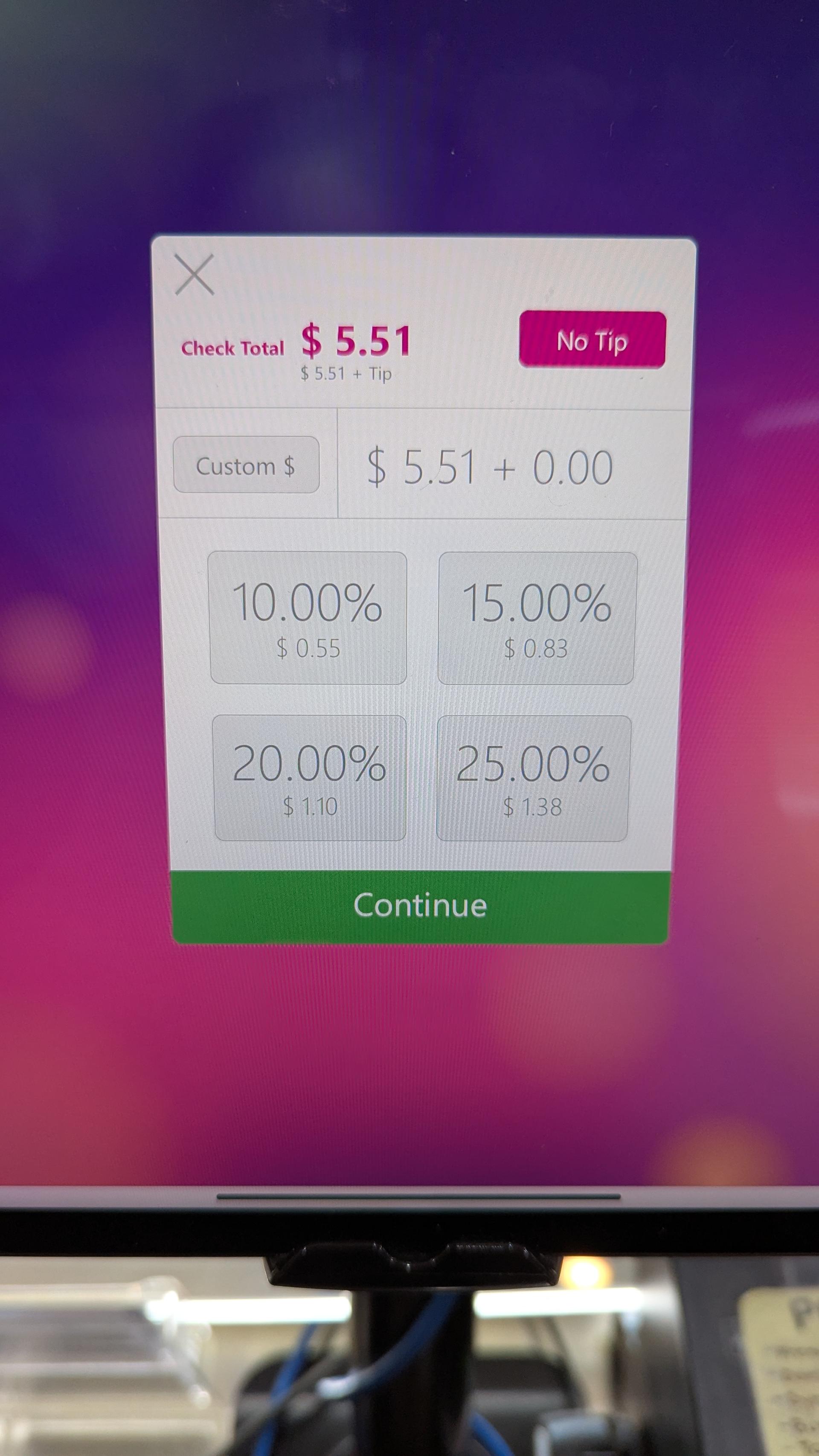
The Tips screen when using percentage based tips shows unnecessary trailing zeros on the customer display for the percents. The numbers are entered as a whole number and do not have any decimal in the back office. If for some reason a company decides to go with a decimal number I think it would be ok to display, but don't think I've ever seen that happen.

Assign discount to all split checks (Discount only stays on the original check)
When splitting a check that already has a check discount on it, distribute the check discount to all new split checks.
Becomes very cumbersome and inefficient having to re-add discount to to newly created checks after splitting when the discount applies to everything.
Loyalty Point Accumulation Clarity to Customers
In both the Mobile App & Web Order there is missing component that informs the customer how the loyalty system works. Currently there is only a a counter for points, but there should also be information such as:
- Point accumulation per dollar spent
- Point accumulation per visit
- Notes section which clients can add text and/or maybe an image
- The reason this is important is sometimes promotions are ran we need a way to communicate that the current points summary is only temparary. For extended promotions new customers may not realize that the current accumulation is not the standard which leads to discontent when the promotion ends.

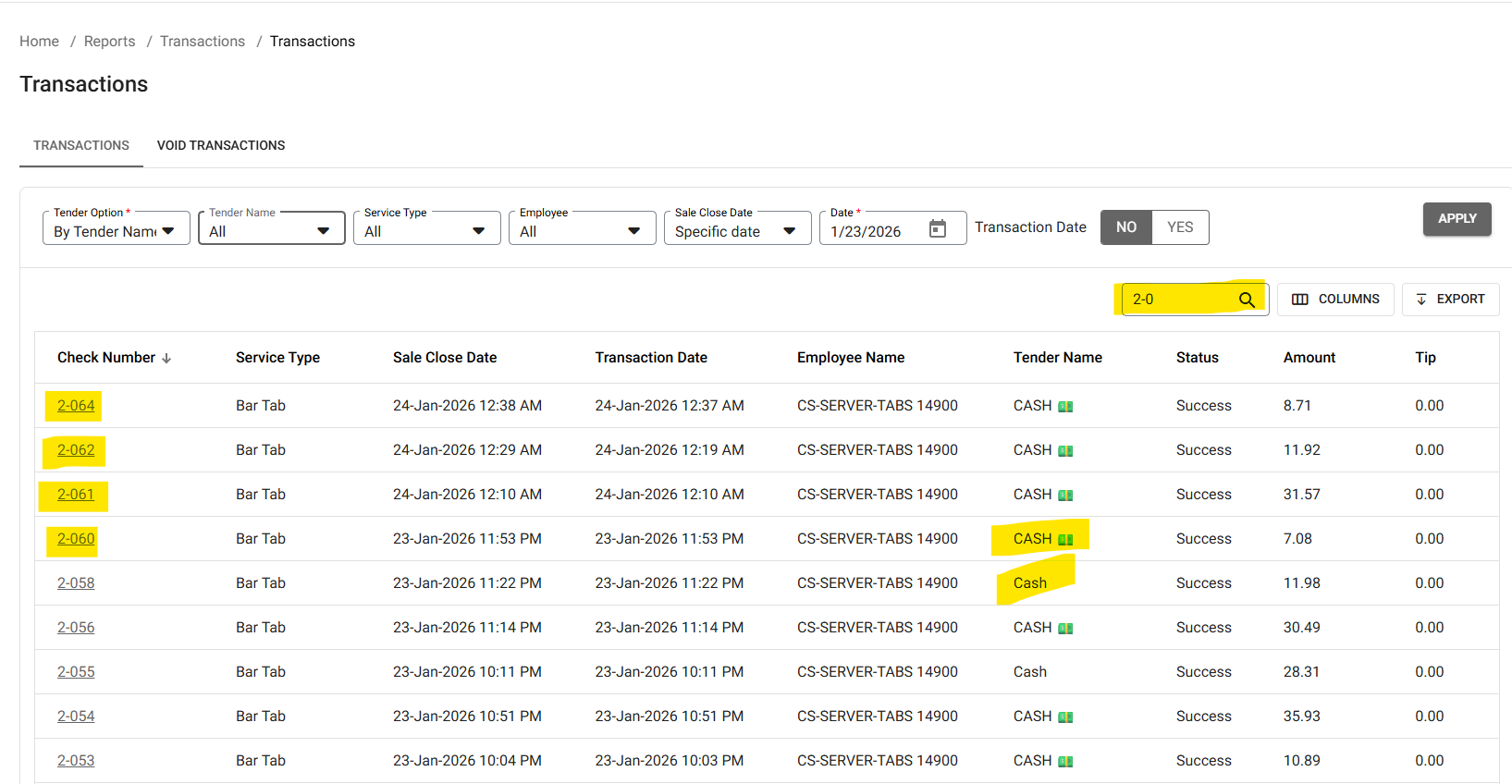
NEED TO ADD THE OPTION TO LOOK UP TRANSACTIONS BY TERMINAL
This is one that popped up today.
There is no way to have a Cash Drawer Report to show how much is in the drawer with multiple employees using the drawer.
You have to pull a report and do a search by check number that corresponds to that terminal to see what was rung in that terminal. Pull out a calculator to add up what's in the report, In this case its Terminal 3 which starts with a 2 (see below) (Terminal 1 starts with a 0). If there's an issue (like what happen today) they have to tally up the amounts below and then count the drawer. That is a lot of paperwork and prone to human error if they add a wrong number or a poorly placed decimal point.
We need to be able to pull a Cash Drawer Report and it have it say:
A-000 Bar Left (or Bar Left Receipt Printer)
* START BANK: +$300.00
* CASH SALES: +$800.00
* PAY OUTS: -$150.00
* TOTAL CASH IN DRAWER: =$950.00
If you want to blow away what other POS companies have this section after "TOTAL CASH IN DRAWER"
Cash Sales by Employee
Billy - $200.00
Angela - $350.00
Joanne - $250.00

To Go / Web Orders to Automatically Print the Customer Receipt
Merchants need to have the customer receipt printed automatically on the Front Receipt printer whenever To Go or Web orders are placed. This allows the staff to quickly attach the receipt to the to go/web orders and confirm if its been paid or not.
Right now, they are having to go back to the POS to confirm if its been paid and if not, print the receipt and have the customer pay. It is slowing down the operations for busy operators and restaurants.
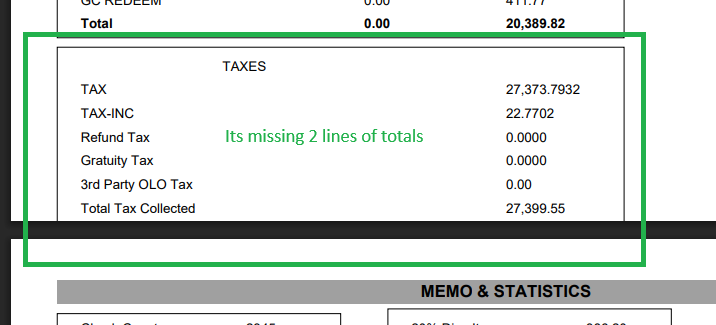
PDF REPORTS ARE NOT ALWAYS CLEAR
I was downloading each month for 2025, but when I go to review them, certain months are not clear and some parts are getting cut off and totals cannot be seen. Some show fine but on certain (Busy) months its messy
Can this be adjusted? Preferably it should print as it shows on the screen (See screen shot/video) just because this is how customers are viewing it.
attached is one of the PDF reports and video
ALT POS NYC - Google Chrome 2025-12-20 12-3....mp4
07-July-2025_SEH_Sale Recap Report201220251....pdf

Show Customer Name in Transactions Report
"Back Office -> Transactions -> Report"
When showing the transactions, customer name doesn't show in the list of columns and it is not possible to search by customer name. It doesn't make sense to open each transaction to find the customer name. When opening an order, the customer name is already there, can't you just show it?
When I contacted the support, they suggested sumbtting a feature request and also they shared this "There is another way to search for a transaction by customer name. From the home screen, navigate to Customers > Customer Info > Search the customers name > under Actions, select View Customer Metrics, and you will see the history of the customer transactions. This will only work if the customer's info was attached the the transaction at the time of sale."
This won't work if a customer places an order as a guest without creating an account (which actually happens a lot).
Customer support service by UserEcho



