LINGA — Feature Request Forum

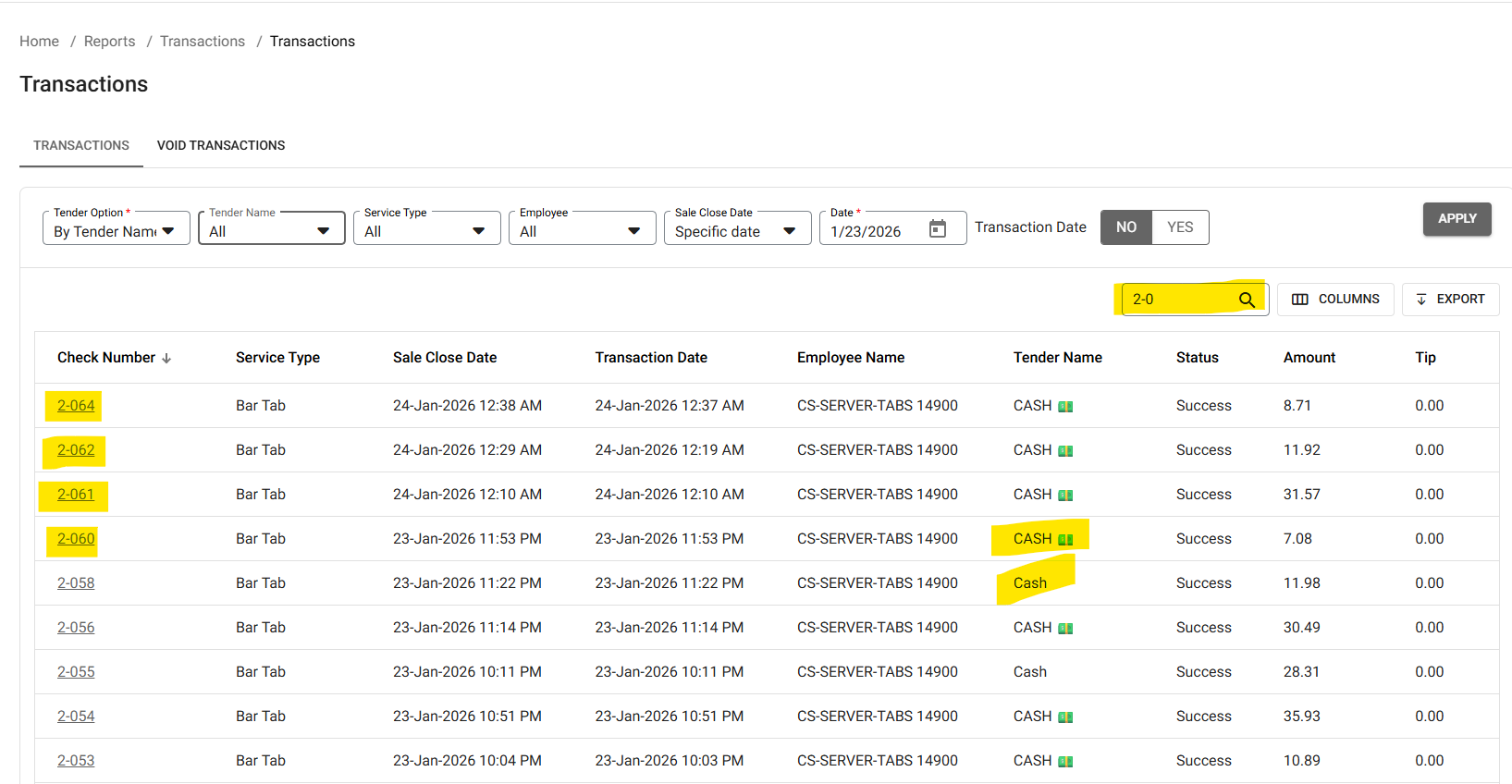
NEED TO ADD THE OPTION TO LOOK UP TRANSACTIONS BY TERMINAL
This is one that popped up today.
There is no way to have a Cash Drawer Report to show how much is in the drawer with multiple employees using the drawer.
You have to pull a report and do a search by check number that corresponds to that terminal to see what was rung in that terminal. Pull out a calculator to add up what's in the report, In this case its Terminal 3 which starts with a 2 (see below) (Terminal 1 starts with a 0). If there's an issue (like what happen today) they have to tally up the amounts below and then count the drawer. That is a lot of paperwork and prone to human error if they add a wrong number or a poorly placed decimal point.
We need to be able to pull a Cash Drawer Report and it have it say:
A-000 Bar Left (or Bar Left Receipt Printer)
* START BANK: +$300.00
* CASH SALES: +$800.00
* PAY OUTS: -$150.00
* TOTAL CASH IN DRAWER: =$950.00
If you want to blow away what other POS companies have this section after "TOTAL CASH IN DRAWER"
Cash Sales by Employee
Billy - $200.00
Angela - $350.00
Joanne - $250.00

Suggested tip on split by seat checks be for each seat and not the whole check
We had a merchant notice that when they did a Split By Seat, the suggested tips on the CC receipt were based on the whole check and not just that seat. I explained they would need to split by check to avoid that because split by seat is still one check and that's why it does that but they asked me to submit a feature request. I think it would be nice if it worked this way.


On the reports, can we add the $ sign when referring to monetary amounts
On the reports, can we add the $ sign when referring to monetary amounts?
PDF REPORTS ARE NOT ALWAYS CLEAR
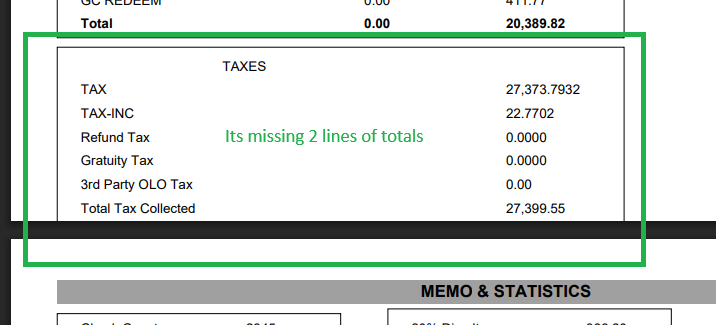
I was downloading each month for 2025, but when I go to review them, certain months are not clear and some parts are getting cut off and totals cannot be seen. Some show fine but on certain (Busy) months its messy
Can this be adjusted? Preferably it should print as it shows on the screen (See screen shot/video) just because this is how customers are viewing it.
attached is one of the PDF reports and video
ALT POS NYC - Google Chrome 2025-12-20 12-3....mp4
07-July-2025_SEH_Sale Recap Report201220251....pdf
Gift Receipt Option For Gift Cards
It would be a nice feature to be able to print a gift receipt when needed. For example, when selling a Gift Card, sometimes the customer wants a Gift Receipt to show the value added to the card. It would need to be able to be printed by item as it would only be needed for certain items. If a customer was having dinner and wanted to buy a gift card with as a gift for someone, we would only want the gift receipt for the gift card and not every item on the check.

Feature Request: Partner Access to POS System Logs for Cloud POS
Purpose:
Allow partner support teams (e.g., EMS/Kurv) to access POS application logs directly within the Cloud POS platform. This visibility would enable faster triage of software-related issues and more detailed escalation reports to Linga’s development team, shortening resolution times.
Current Limitation:
Partner teams currently lack access to POS system logs. When issues occur—such as app instability, missing transactions, or synchronization failures—we must submit a ticket and wait for Linga’s developers to extract and interpret logs. This often delays resolution by several days, even when the symptoms could be quickly identified from POS-level data.
Proposed Enhancement:
Provide authorized partner support users with read-only access to Cloud POS system/application logs through the partner portal or an API endpoint.
Key Requirements:
-
Scoped Access Control:
-
Access limited to merchants managed by the partner organization.
-
Read-only permissions only—no modification, deletion, or system control.
-
-
Log Categories Requested:
-
POS application logs (service events, exceptions, app restarts).
-
Communication logs between POS, peripherals, and backend services (API requests/responses, timeouts, sync failures).
-
Configuration and sync logs (menu updates, local cache status, data push/pull activity).
-
Database-related errors or transaction anomalies (for identification, not correction).
-
-
Filter & Search Capabilities:
-
Date/time range selection.
-
Merchant or device identifier filtering.
-
Keyword search by module, error code, or event type.
-
-
Export Options:
-
Ability to export logs for documentation and inclusion with escalations.
-
Value & Impact:
-
Faster Issue Identification: Partner support can immediately pinpoint probable causes—such as sync failures, timeout patterns, or database access errors—without developer intervention.
-
Better Escalation Quality: Log details give Linga’s dev team clearer diagnostic data, improving accuracy and reducing back-and-forth communication.
-
Reduced Resolution Time: Streamlines triage for both teams, leading to quicker fixes and less downtime for merchants.
-
Enhanced Merchant Experience: Shorter wait times and more informed responses during support interactions.
Example Use Case:
A merchant reports delayed transactions and missing receipts. With access to POS logs, our support team could detect repeated sync timeouts or database write errors, confirm the issue scope, and escalate to Linga with specific timestamps and error references—allowing the dev team to resolve it faster.

Auto Discount Removal
Customer wants to be able to manually remove auto discounts from items on POS.
SEEING CHECK INFO AFTER THE CHECK IS CLOSED
As of right now you can view an open check in the back office and view who ordered which item and at what time. Once the check is closed you cannot see this info. If this feature can be added to the TRANSACTION REPORT would go a long way for owners to police their staff.
It would be nice to have the option to view a closed check and see that information. along with a time stamps. This will help identify "RED FLAGS, THEFT, FOUL PLAY etc..."
| Check:1-057 | ||||
| Table: 22 | ||||
| Tab Name: Big Moustache Guy | ||||
| ITEM | ACTION | REASON | EMPLOYEE | TIME |
| JW Blue | Order | Manny | 17:20 | |
| Brooklny Lager | Order | Manny | 17:20 | |
| JW Blue | Disc | Happy Hour | Manny | 17:20 |
| Brooklyn Lager | Disc | Happy Hour | Manny | 17:20 |
| Burger | Order | Manny | 17:40 | |
| Tacos | Order | Manny | 17:41 | |
| JW Blue | Item Void | Wrong Item | Bob | 18:05 |
| JW Red | Order | Bob | 18:05 | |
| JW Red | Repeat | Manny | 18:15 | |
| Brooklyn Lager | Repeat | Manny | 18:15 | |
| Brooklyn Lager | Item Void | Wrong Item | Manny | 19:15 |
| Payment Applied | CASH | Manny | 19:15 |
TEXT INSERTION/OVERLAY FOR NVR SYSTEMS
This was a request comes from one of my bars. They switched from Lightspeed and they had this feature. Their 2nd site has Aloha and is currently using this feature.
For Aloha they are using a Text Capture Device via the RS-232 serial connection, which we don't and can't use. Lightspeed uses a Text Exporter via IP. Not sure the methodology for the Text Exporter.
But I do know that both options allow the text overlay to be recorded for playback. All it really needs to show is the item, modifier, discount, removal or void and the payment method (Cash, Credit Card, Gift Card, Comp etc...)
AS FAR AS I KNOW - Toast does not offer this.
Customer support service by UserEcho