LINGA — Feature Request Forum

Save preferred Payroll Columns
The program should be able to save each customers preferred Payroll Columns- it used to-
PLEASE fix this for your customers.

Update the ticket in the cloud as items are added to it
Update the ticket in the cloud as items are added. Right now the way tickets are created is that it creates the ticket and nothing saves to the ticket or the cloud until finish is tapped. What happens in this case is that when the device freezes and has to be restart it brings back up a blank ticket and they have to start over entering items again.

ADD A NON-CASH PAYMENT METHOD FOR 3RD PARTY DELIVERY APPS
Hey Guys,
Can we add the ability to create a non-cash payment method for the 3rd Party Delivery Apps like Uber Eats, Grub-Hub, Door Dash, Fauntan etc… with the ability to add a Tip/Gratuity and or Delivery Charges and have it print on the check.
This will allow the clients that do not want to integrate the Delivery Apps into the system (silly, I know, but hey) to add the orders in to the system and keep track of those sales (and tips for when they use their own drivers)
This will also give Clients the ability to cross check the money they are receiving from these Apps
I was playing with the Idea of deferred payments kind of like a house account since they get paid weekly or monthly for those.
This will work for those clients that have their own Online Ordering System
Expanded Item Availability For Days
Add the functionality to allow days of the week as well as time availability/restriction on categories and items.
For example if Breakfast items are available M-F from 7am - 11am but 7am-Noon on Sat & Sun. Right now they have to be separate items which causes reporting to be confusing.

Shift Loyalty and Deposit Calculations to Pre-Tax Logic
I am writing to request a change in how the system handles tax calculations when Loyalty points or Deposits are applied. Currently, the system calculates these payments after taxes and fees have been applied to the full subtotal. This logic results in a "tax on tax" effect or a discrepancy that overcharges the customer compared to the actual remaining balance.
The Problem:
When a deposit or loyalty credit is treated as a post-tax payment rather than a pre-tax deduction, the customer ends up paying taxes and fees on a value they have already partially cleared.
Mathematical Proof of Discrepancy:
- Transaction Total: $100.00
- Applied Taxes & Fees: 8.88% Tax + 3.12% Card Fee.
- True Gross Total: $112.28
- The Deposit: The customer makes a $10.00 deposit. Including tax and fees, they pay $11.23.
- The Math: Total ($112.28) - Paid ($11.23) = $101.05 (Expected Balance).
- The System Issue: Currently, Linga shows a balance due of $101.97.
- The Discrepancy: This creates a $0.92 – $0.97 error on a small $100 order.
Scalability Concern: This error scales significantly with larger transactions. For a $10,000 banquet with a $5,000 deposit, the calculation error grows to $457.85. This is a significant financial discrepancy that is difficult to explain to a merchant or a guest.
Proposed Solution:
Update the calculation logic so that all Deposit and Loyalty operations are deducted from the subtotal before taxes, additional fees, and card charges are calculated. This ensures that taxes are only applied to the remaining taxable liability, maintaining accounting integrity and preventing double-charging of fees.

Tip sharing does not update when an employee hours are changed in the back office
LINGA reporting does not update the tip sharing values when an employee's hours are changed. For example, if a store has their tip sharing set up to share tips based on the hours worked and an employee had their hours adjusted in the back office (for example, an employee forgot to clock out), the reporting will not update the tip sharing amounts.
Alert system addition: Employee clocked in for too long
Request to add an alert feature that notifies managers/owners when a employee is clocked in for too long. Some employees forget to clock out after the end of their shift, which can affect labor reports. Alert should be definable, a manager or owner should be able to set the threshold when they are notified (i.e., notify me if an employee has been clocked in for over 12 hours).
RESTRICT PAYMENT BY JOB ROLES / NODE / REVENUE CENTER
Hello Request peeps.
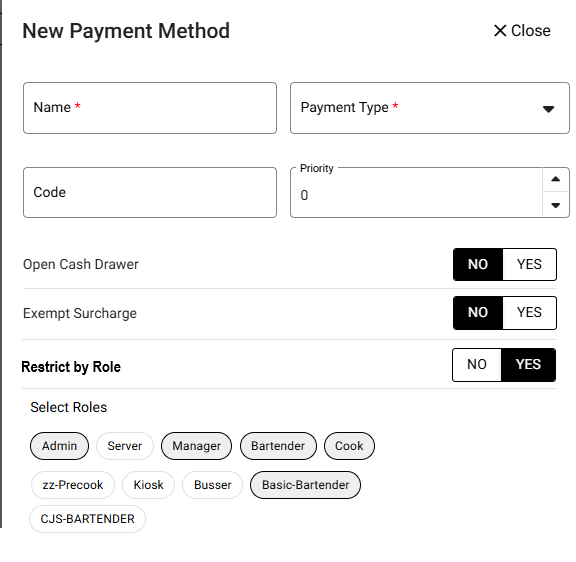
In previous versions of the Software (Pre-Android) I was able to restrict a payment type by "ROLES" but that feature went away. Can we have it back. Client would like to create payment methods and restrict it to a specific Terminal OR Job Code.
They would like to prevent certain ROLES or Terminals from access specific payment types
* SEE ATTACHED PIC FOR DETAIL IDEA
NEED TO ADD THE OPTION TO LOOK UP TRANSACTIONS BY TERMINAL
This is one that popped up today.
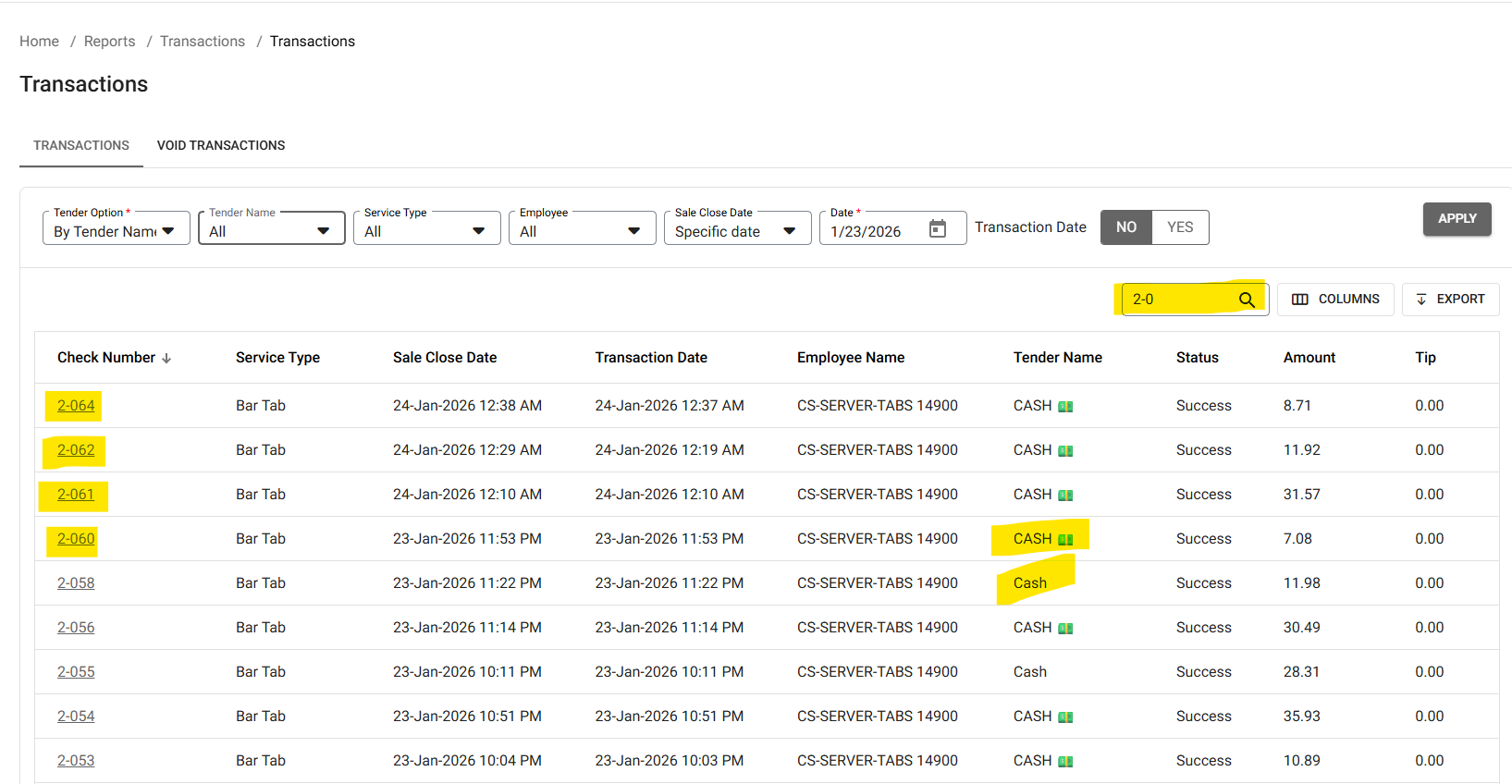
There is no way to have a Cash Drawer Report to show how much is in the drawer with multiple employees using the drawer.
You have to pull a report and do a search by check number that corresponds to that terminal to see what was rung in that terminal. Pull out a calculator to add up what's in the report, In this case its Terminal 3 which starts with a 2 (see below) (Terminal 1 starts with a 0). If there's an issue (like what happen today) they have to tally up the amounts below and then count the drawer. That is a lot of paperwork and prone to human error if they add a wrong number or a poorly placed decimal point.
We need to be able to pull a Cash Drawer Report and it have it say:
A-000 Bar Left (or Bar Left Receipt Printer)
* START BANK: +$300.00
* CASH SALES: +$800.00
* PAY OUTS: -$150.00
* TOTAL CASH IN DRAWER: =$950.00
If you want to blow away what other POS companies have this section after "TOTAL CASH IN DRAWER"
Cash Sales by Employee
Billy - $200.00
Angela - $350.00
Joanne - $250.00
Customer support service by UserEcho