LINGA — Feature Request Forum

blank line between menu items on KOT
Its very hard to read KOT when there is no blank line between menu items
a blank line between each menu item would help the chefs clearly see what are modifiers and what are meal items

Send to kitchen by seat
When ringing in items by seat initially, without pressing BarTab it will only send the current seat selected to the kitchen. It would be nice to have an optional pop up to remind the server that they did not send the rest of the seats to the kitchen. That or when pressing finish, having an option to auto send the rest of the seats would be beneficial.
Display Stock on Hand Balance on Item Button
I love the 86 list function... but the system should also allow the display of SOH balance on the item button if its not displaying the 86 list value
Ideally it should be an option to display SOH Balance on the item button if the item is not on the 86 list
we use the 86 list for items we make (often different quantities each day).. we need SOH balance to display for retail items that we buy in and are stored.

Edit Sent Items !
I know this is previously unheard of, but I'm hearing it more and more.
Some people (apparently mostly in counter service operations) want to be able to change modifiers on items that were already sent to kitchen. Doing this without voiding an item and ringing it up again.
They insist that their "previous system could do this". I am thinking it could be a toggle you can turn on to allow sent/already ordered items to be edited.
Apparently this comes up a lot with owner-operators that need to make adjustments to orders without sending the items to the kitchen again.

Enable Tipline,Signature and Suggested Tip on Credit Card Payment only
Hopefully we have a feature on the front end recept to enable Tipline,Signature and Suggested Tip on Credit Card payments only and not on cash payment

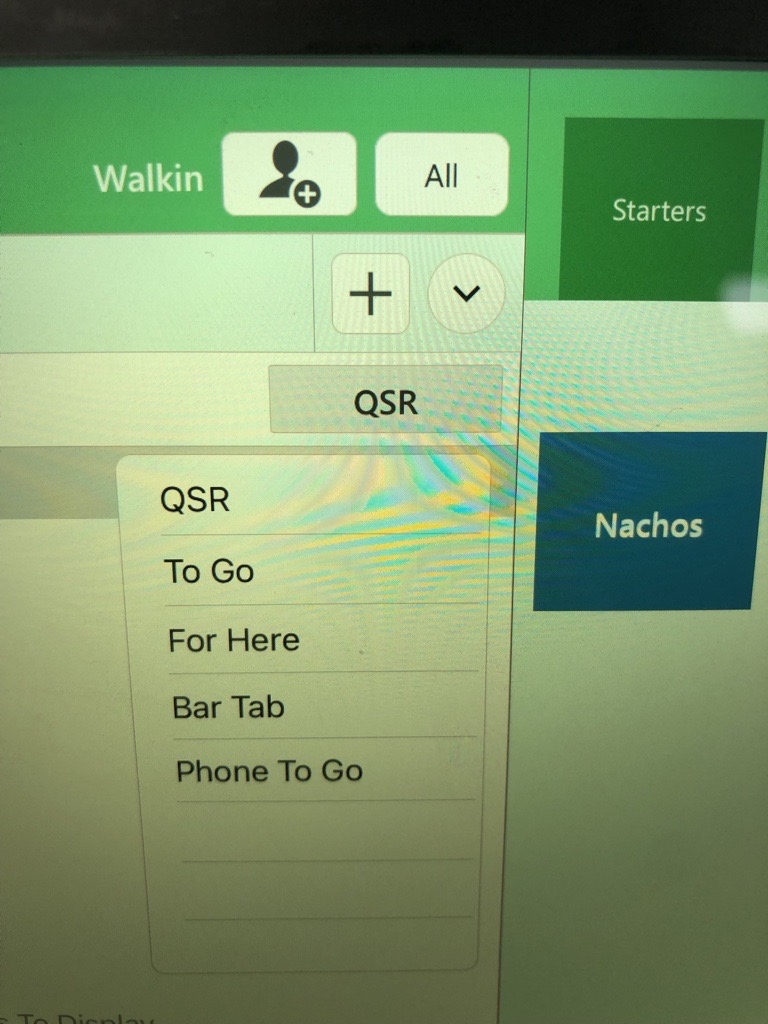
Future Order in Order Type drop down
Add the ability to change Order Type from QSR to Future Order and select a future date and time.
Currently, users can change from QSR to To Go, For Here, Bar Tab, Phone To Go. But I would like an option to select Future Order and be able to select another date and time.
See attached photo.


Sound for Online order Is Not Hearable
I know this feature was asked here: https://requests.lingapos.com/communities/1/topics/344-sound-for-online-order
However, I reached to the support (specifically rjohnson@lingaros.com) and the answer was: "As of now the notification sound is default and mild". We really don't hear any sound when an online orders comes. Only a pop-up notification. The sound has to be loud enough so we can hear. Currently we don't hear anything even we're next to the ipad. There are no ipad issues and the ipad sound is turned up all the way (we hear ipad sound when playing a video or a song. so there is no issues with the ipad)

Prompt for Name on QSR
Would like the option to prompt for a customer name when doing a QSR order like when doing a BarTab order.
Split Item Quantity / Break Qty to new line item(s)
We need to be able to move parts of an item's quantity to a different seat or check.
You have an item with a large quantity to it, already sent to kitchen, you should be able to either in the item options or in the split seat or split check screen, break off some of that quantity into a new line item.
Here's a real world example that I was just told by the merchant:
You ring up 15 empanadas, when they come in there's actually 4 people that each want to get their own check to pay for.
When you separate the empanadas 15qty item into 4 checks, you get 4 empanadas with 3.75 qty each.
So when you print their check each one is paying for 3 and three quarters of an empanada?
Let us break off a quantity into new line items.
Customer support service by UserEcho


