LINGA — Feature Request Forum

Splitting Checks
It would be nice when splitting checks you can add a check and select multiple items on the original check that you want to move over to the new check instead of having to select one item at a time and move it before selecting another item...

Getting rid of percentage discounted in Combo discounts online
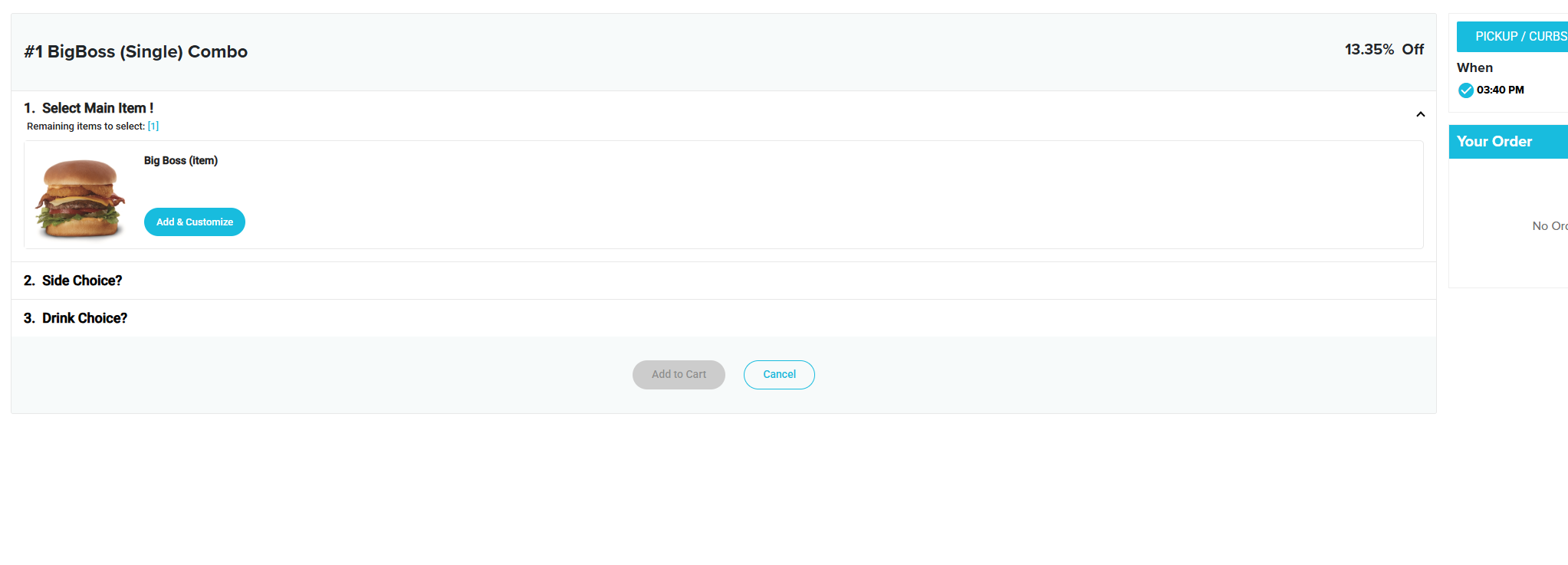
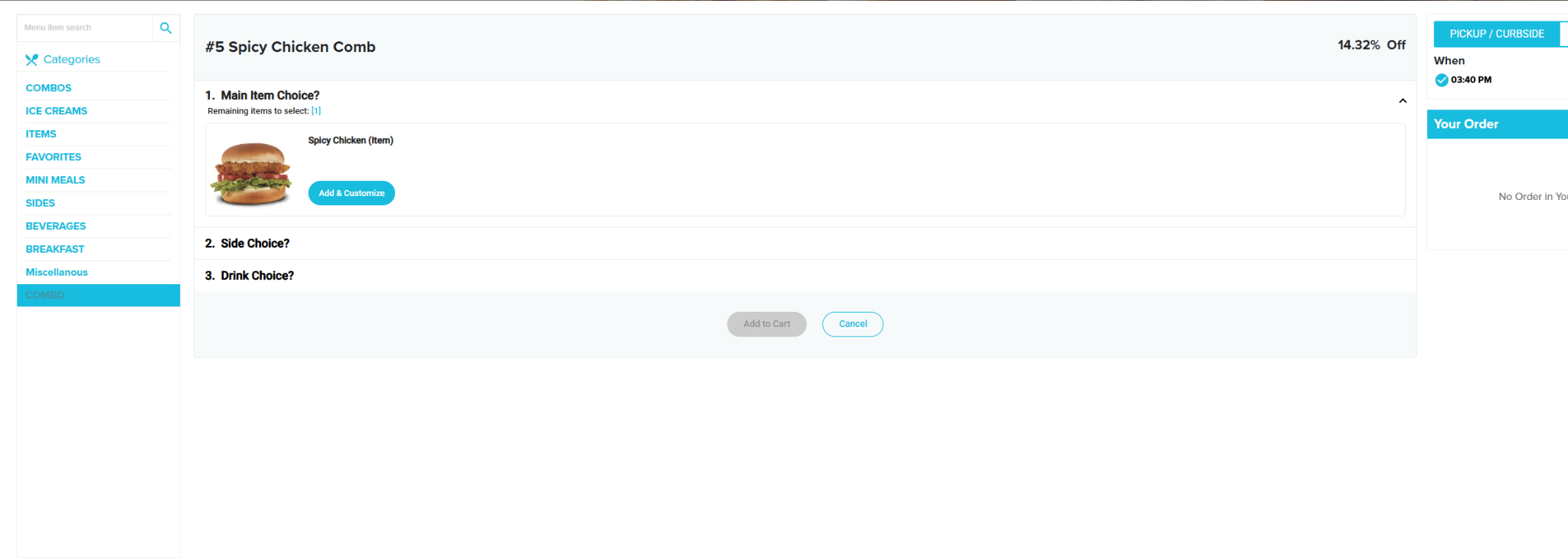
Ability to Hide “% Off” on Combo Discounts in Online Ordering
When using Combo Discounts in Online Ordering, Linga automatically displays the calculated “% Off” next to each combo.
Our customer would like the ability to hide this percentage from the online ordering customer.
As shown in the attached examples, the Spicy Chicken Combo displays 14.32% Off, while the Big Boss Combo displays 13.35% Off. The customer does not discount every combo by the same amount because each combo has its own established selling price.
These combos are not being advertised as percentage-off promotions. They are simply menu combos offered at a set combo price. The customer does not want guests comparing the displayed percentages and asking why one combo receives a larger discount than another.
Feature Request: Please add an option to hide the calculated “% Off” for Combo Discounts in Online Ordering while still applying the combo pricing normally.
If this same percentage is displayed in Kiosk mode, we would like the option to hide it there as well.

Product Item with Tiered Pricing
Please allow a Product/Item to have tiered pricing. The first, second and third items are full priced and after you select the fourth item, tier level 4 the 4th item is now $0.00.

House Account Name on Customer & Merchant Copy of Receipts
Print the House Account Name of the Customer and Merchant Copy of Receipts.
Ability to Print Shelf Labels from the Back Office
Provide the ability to print shelf labels, product labels, etc from the back office for retail items.
Back Office Timing Out / Logging Out
I'm surprised that I haven't seen this request or at least I couldn't find it.
When working in the back office you get logged out after a period of time, even if you've been actively working and making changes. It is frustrating and merchants are frustrated especially when in the middle of changes and then losing those changes.
Instead of automatically logging someone out of the back office after a period of time could there at least be a pop up that asks if you want to stay logged in. If someone doesn't click on yes within something like 30 seconds, then log them out.
Whoever thinks the current functionality is working and needed for security reasons... you need to have the applications you work in for an hour two at a time automatically log you out even when you are actively working. Maybe then you would understand why people get mad.
Here is email I received from a merchant
Do you know the time limit on the back office timing out? When it just goes back to the login screen??I'm going to be so pissed if I'm entering a super long invoice and it times out on me because it does not save my progress and I will just have to start over. Just bitching. Sorry. But also curious if you know how long I have before it times out.
The ability to have the Sell Price display on a Item button
Have the ability to display the sell price of an item on the button itself without needing to manually type the sell price into the name of the item. That way, if the sell price is updated, what appears on the button will also change.

Faster / Easier Way to Comp an Item
The current process to comp an item, using Open Discount, takes too much time when a restaurant is busy. It would help to have predefined reasons to choose from.

Recurring or One Time Holiday Schedule Setting
Hours Exceptions/Holiday Schedule page where they could enter:
- Thanksgiving: Closed
- Christmas Eve: 8 AM–3 PM
- Christmas Day: Closed
- New Year's Day: 10 AM–6 PM
...without modifying their normal weekly schedule.
Payment Function on Split Check Screen
I'm trying to figure out a faster way to take payment on a check that has been split.
In Quick Service, I know we can't split a check for some reason. Quick Service restaurants take call in orders that can be larger and be for more than one person. Often when the person who comes in the pay for the order, items need to be split off of the order that was called in because various people are paying for their individual items with their card or with cash and expect change back for just their items.
So, the work around is to enter the order as a Bar Tab (or however it's been renamed). We can split items off the original order to a check which can then be paid. However, it's really cumbersome to have to Save and Close the split check then go to the list of checks and then take a payment.
We need a payment function on the Split Check screen to facilitate this much needed Quick Service operation.
Is there a better way?
Customer support service by UserEcho