LINGA — Feature Request Forum

Kitchen print name for modifiers
Add the ability to have different kitchen print name for modifiers, same like menu items, useful when having modifiers in a different language and still be able to show correctly on customer receipt and CDS.

DESELCT INCLUDED MODIFIERS IN ONLINE ORDERING
The ability to deselect included modifiers in online ordering, the same way you can on the POS. This would eliminate the need for "no" prefixes and "no" modifier groups. It would look better on OLO and the kitchen ticket.

Customer Info Prompt Before TOGO/PICKUP Order
Hallo!
Could you please make a setting so when taking TOGO/PICKUP order it prompts a server to fill up customer's information with mandatory Name and Phone number?
Otherwise, it creates chaos in the kitchen when they forget to do it manually.

We do have this option available when system will go to customer profile before starting the Togo/ForHere orders. Setting is under OPERATIONS --> POS SETTINGS --> ORDER TYPES --> REQUIRED PHONE NUMBER FOR FOR HERE ORDER --> NEED TO ENABLE

This feature is now available with our new release 4.6. Call us to get more details. Our Marketing team will be sending out an email regarding this.

Gift Card exempt from cash discount
We would like the ability to exclude Gift Cards from having the Cash Discount applied to them. We're using Factor4 gift cards through Pax S300 card readers. Our customer wants to charge the cash discount on credit but not on gift.

Phone number required for OLO
Can we make a requirement to a customer must provide a phone number to complete an online order?

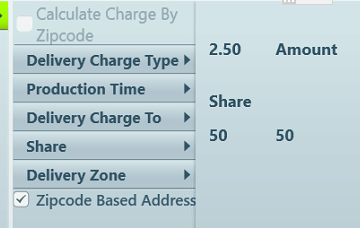
Driver delivery charge share with house
In BEVO we were able to split the delivery charge between the driver and the house via a percentage.

Show price if paid in cash on receipt
Customer would like to be able to see a "If paid in cash" option on delivery and customer receipts. The store has regular cash discounts and on the receipt it shows the total and the amount for the discount, but they would like just one line that says the actual total if the customer pays in cash

Shift timing in OLO / Call Center
Team,
Could you please add shift timings for zenpepper/call centre, similar to our Linga back office timings.
Thanks & Regards,

iPads is stuck on offline
I have two iPads and one of them says offline and the other is online. Every time I try to connect the one that is offline it also disconnects the other iPad and both of them get stuck offline. This is the second time this has happened. The one that is stuck offline will not print tickets or payments also. I have also talk to someone from support but still nothing has been resolved.
Customer support service by UserEcho

