LINGA — Feature Request Forum

Print batch report on auto batch
Customer has requested the batch report to be automatically printed for auto batches. Report will print out automatically when running a manual batch but will not when an auto batch is ran.
The toggle under batch settings in the BO is enabled, does not seem to affect the auto batch.
Select time on Future Orders
On the order type selection pop up, the user would tap on the time (not the arrows) and select what time the order will be due instead of having to use the selector errors.

ADDING A DEPT TO OPEN ITEMS
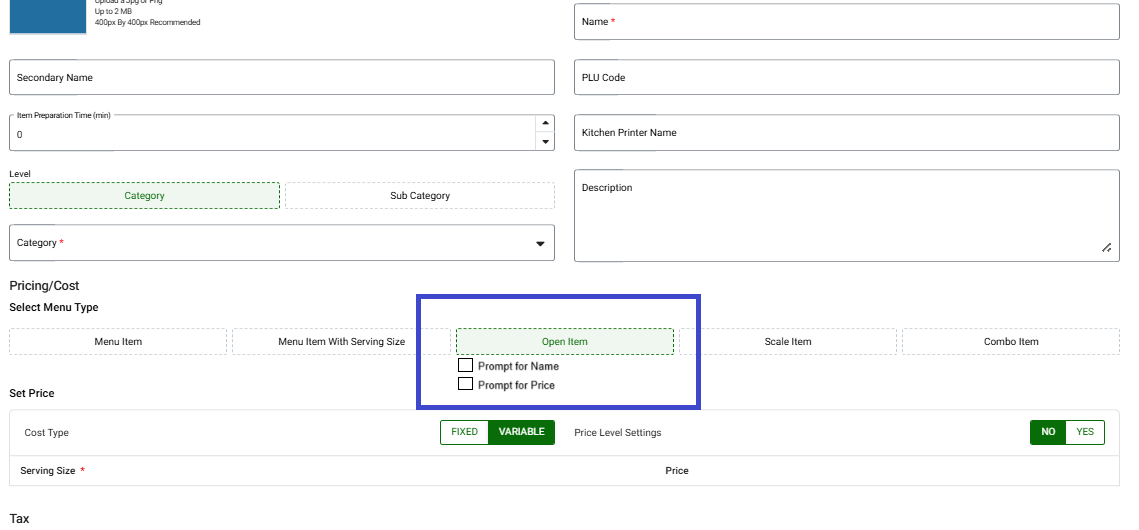
As of right now if you want to add the name to an [OPEN ITEM] for the kitchen/bar you have to use the Open Item under the [OPTIONS] button but this doesn't record the item into a DEPARTMENT (Food/Beverage/Liquor etc...) Messy for reporting for bigger restaurants looking to track cost carefully.
If you create an item as an [OPEN PRICE] you can add it to a Category with the correct Dept but you can not enter a name. It will be a fixed name which means the server still has go to the kitchen/bar to tell them what it is. This means more work for the server to have to go from their station to the Bar/Kitchen to tell them what it is.
What I would like to see which is available in other POS systems is the ability to create a button called [OPEN FOOD], [OPEN APP], [OPEN DRINK] etc.. and have a toggle to Promt for Name and/or Price and this will trigger the keyboard to enter the Name of the item hit [OK] then have it will prompt for a price and hit [OK]. Have the ability to create the button under the Category or Sub-Category like any other Item and it will follow everything else like any other item (Tax, kitchen print and Dept)
CATEGORY [ENTREE]
[OPEN FOOD]
> enter name here (keyboard) < [OK]
> enter price here (number pad) < [OK] (zero price item not allowed)
this will trigger being sent to the kitchen printers pre-set as you would any item, taxes and record sales to the correct dept registered to the Category
ADD A RESTRICT OR HIDE MODIFIER GROUP BY JOB ROLE
In most bars the bartender does not have to select modifiers unless the modifiers has a dollar amount. The Severs, however need to place a detail order for the bartenders to make the drinks
Bar Order: Absolut > Martini +$3.00 - Done
Server Order: Absolut > Martini +$3.00 > Extra Dry > 3 Olives - Done
This can also be apply to restaurant that offer both Counter & Table Service
Can we add a Restrict Option by "Job Role" to the either the Modifier Group (<< Ideally This) or under the Products/Items > Mandatory or Optional Modifier Sections

Restrictions on Punches : Stop Early Clock In / Time Theft
Currently Linga has no way for merchants to stop their employees from clocking in early.
Merchants either have to constantly be editing time sheets or lose money on employees clocking in too soon in the morning.
Even if you don't use the employee scheduler, it should let you set a time in Application Settings before which no one is able to clock in without manager approval.

Exempt Item or category from Dual pricing/ surcharge
NRS Has a feature that you can exclude an individual item from dual pricing / surcharge.
This is useful when a merchant sells something like gas in which they are not allow to charge a surcharge on.
Yes I was able to create a payment type button that excludes the surcharge, called Gas Card, but you can not mix gas and other items in the same check that way.

View Split Check At the same time
Should be able to split a check and see all the splits on the same time. Similar to how if you split seat you can toggle from Seat 1, Seat 2, or table. you should be able to split the check, then toggle from split to split without navigating back to the all tabs screen.
Void a Modifier from an ordered item
Would be nice to have the ability to void a modifier from an already ordered ite.
If a server sends an item with an incorrect modifier, they ordered a Steak with an add on by mistake, they need to be able to void the modifier without voiding the entire item and re-ringing.

DATE AND TIME FORMAT
Date and time format set in Back office application settings to be in POS screens
Sorting Batch screen by check
Provision to customize the order of transaction on the batch screen, user wish sort the transactions by check # rather than chronologically.
Customer support service by UserEcho



