LINGA — Feature Request Forum

CHANGES TO LABOR REPORT
So under Reports: Employee: Labor my customers are asking for overtime hours to be shown in the report. I know you have it in OT Based Payroll. But using that report generates a huge list of information. what my customer is looking for is a regular hour and overtime hours column that adds up to the "Hours" column. so he can send this to his bookkeeper. So how the labor report is set up right now ie EMPLOYEE ID: NET SALES: HOURS: LABOR: % OF NET SALES: LABOR PERCENTAGE: SHIFT STATUS.. So all he leaves on is Labor Hours. Then he digs threw the other reports to find the overtime hours and hand writes it to the left of total hours.
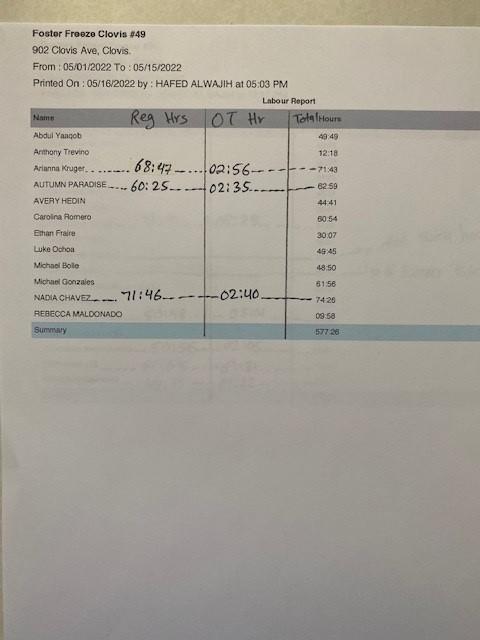
So can you add Regular Hours and Overtime hours to this report? So the order he would like to see would be something like this. EMPLOYEE ID: NET SALES: REGULAR HOURS: OVERTIME HOURS: HOURS: LABOR: % OF NET SALES: LABOR PERCENTAGE: SHIFT STATUS. Would even be better if you could combine the weekly and daily processes together.
We need to make things easier for our customers not make them work for the data.
Thank You

Manually type forced punch in/out rather than only use the up and down buttons
This one a pretty simple the up and down buttons for editing a clock in/out event are fine to have but make it so we can just type it as well. Easier than sitting there clicking up on the minute side many times.

Employee sales details including side cc breakdown by visa, mc, amex, etc
Do you have a report that will give me the sales transactions by employee with a breakdown of side cc by card type with a total quantity and amount at bottom? I have managers who need to reconcile each employee transaction by card type. If there are hundreds of transaction in a day, it's very hard to calculate each cart type for each employee like how many visa transaction did employee A have and what is the amount for Visa for that employee. It's very time consuming. The transaction report is almost there but not very easy to work with without the employee filter.
The ideal report would be the transactions report sort by employee filter added. That way they could pull up only one employee at a time and get total at the bottom. Also it needs to have quantity of card type at the bottom.
You should also allow the top headings like
| Check Number | Date | Payment No | Employee Name | Tender Name | Card Type | Card Number (Last 4-digits) | Auth Code | Status | CC Tip Charge $ | CC Service Charge $ | Amount $ | Tip $ |
|---|
to be sortable by the column I want. For example if I click on card type, it will put all visa together and mastercards together, etc...If I want to sort by amounts or by check number, I would simply click on column header.
Thank you,

Tax option need to add during purchase or reviving inventory items

Customers default to link to all stores
Some enterprises do not want customer profiles to be linked to just one of their stores. When a customer profile is created from the POS, it is only linked to that store. The enterprise admin will then have to export, update all of the customers data in excel to be linked to all stores, then re upload. Can we add a option to automatically link customer accounts to all existing and newly created stores?

Allow special characters to be include in SKU codes
Allow merchants to create inventory items with special characters, i.e. periods (.), hyphens (-).
Merchants can receive items that have special characters included in the SKU codes from the manufacturer of that product. They are unable to scan these products into their inventory system in Linga.

Shift Reports by Day Part/Meal Period
Shift Reports by Day Part/Meal Period.
- Improve reporting to allow meal period granularity.
- Reporting by Breakfast, Lunch, and Dinner.
- Allow for individual print-outs per shift/meal period.

Employee time Clock report
Request for a notification to be provided when an employee is about to hit a set amount of hours/going into overtime. Example- if an employee clocks in on Monday but forgot to clock out and doesn't return back to work until Thursday, the system has already accumulated more than 40 hours for the employee and need to adjust their time. A notification alert allows the management team to know ahead of time so issues of unauthorized pay being provided to employees who did not actually work their shift. Merchant requesting this to be a proactive measure BEFORE they go and perform clock in/out adjustments or for this to be used as a cautionary alert so the management team can make schedule adjustments.
Merchant is aware of the option for notifications to be sent for every clock in/out but this produces too many notifications for large business with numerous employees working multiple shifts. (Example- when having 51 employees work in one day, that produces 104 notifications, but none show the week's total).
Report By Day Part
Need all reports to be able to be run for a specific time period or day part.
If we could define day parts - Breakfast 6am-9am, lunch 11am-4pm, Dinner 4pm-12am, then run a report by day part so see all sales, discounts, payments etc

Cashier Out Report with detailed closed check list
Cashier Out/ Cashout report must have a setting in the back office that allows us to show or not a list of all checks settled by the one person doing close out of the shift. This list must have:
Check Number, Payment Type, Tip, and Total Payment. This list also must have a grand total line at the end that summarizes each column.
Customer support service by UserEcho



