LINGA — Feature Request Forum

Add Labor Reporting to Sales Recap
Can some Labor reporting be added to the Close Day/Sales Recap report for management that might not have access to employee reporting in the back office.
Labor Hours worked that Day
Labor Cost % of Days Sales

Change the default tip amount to 10%
Hey there,
One feature that we need is a way to change the default tip to 10%. For example, when the customer comes to pay for their order and the tip screen pops up, it shows the total amount of the order plus the tip, which is currently set to 0. We would like to set it to default to 10%, and the customer can choose whether to leave that amount or not. We need this because our tip amount has decreased by more than 60% since we changed the POS system. In our previous system, we could set 10% as the default for all our customers, and most of them would tip accordingly. However, now that we don't have this feature, we barely receive any tips.
If you could please take a look at this matter since we really need it, and it's a basic feature that most systems have, we would be really glad!

GO APP
Need to have the app in fullscreen mode and hide the android navigation buttons , app should also require manager pin to quit or close from the screen. this is a issue with servers inadvertently closing the app or wifi.


Confirmation Pop Up before Voiding Check
It would be nice to have a pop up after clicking void under the check options to confirm that the client wants to void the entire check. I know they will learn the hard way after accidentally deleting a few large checks but it would be nice to have a confirmation.
Separate cashier out reports for employees who work two different shifts or two different roles in the same day.
In restaurants and bars, employees will often work 2 shifts in the same day (working a double). If the employee cashiers out for the morning shift and continues working or if the employee cashiers out, clocks out, then clocks in under a different role, it should separate the reports so they can see what they owe the house for each shift.
Ex. If an employee works as a bartender and uses the drawer for lunch. They should be able to cashier out, clock out, then clock in as a server for dinner. The server should have a way to separate the reports so they can see what they owe the house for the dinner shift. This should also occur if an employee works server for morning and lunch, cashiers out and comes back later to work the dinner shift. Right now, they have to complete math by subtracting the morning shift from the night shift and that could lead to errors.

Open Gratuity by Amount
I've had to tell 2 merchants that the system only allows for Percentage based gratuities. Sadly when its busy math is not an option for merchants.

MULTIPLE ACCOUNTS SAME EMAIL
I have a customer that has 3 accounts (each account has 2 or less terminals) and wants to use the same email for all 3 but when I try it says the email already exists. I found a work around but it is not ideal.
Can we allow them to access all 3 accounts with a single email with a drop down option like our enterprise solution without the enterprise level options
Maybe offer an Enterprise solution for Core Subscriptions

Hide Serving Size in OLO
We have merchants requesting to have certain serving sizes not shown in the OLO. For example, only want a medium and large size to show on the OLO, but the item has small, medium and large.
Up Charge on Serving Sizes
We need the ability to up charge on all or specific serving sizes as well under Products/Items > UpCharges
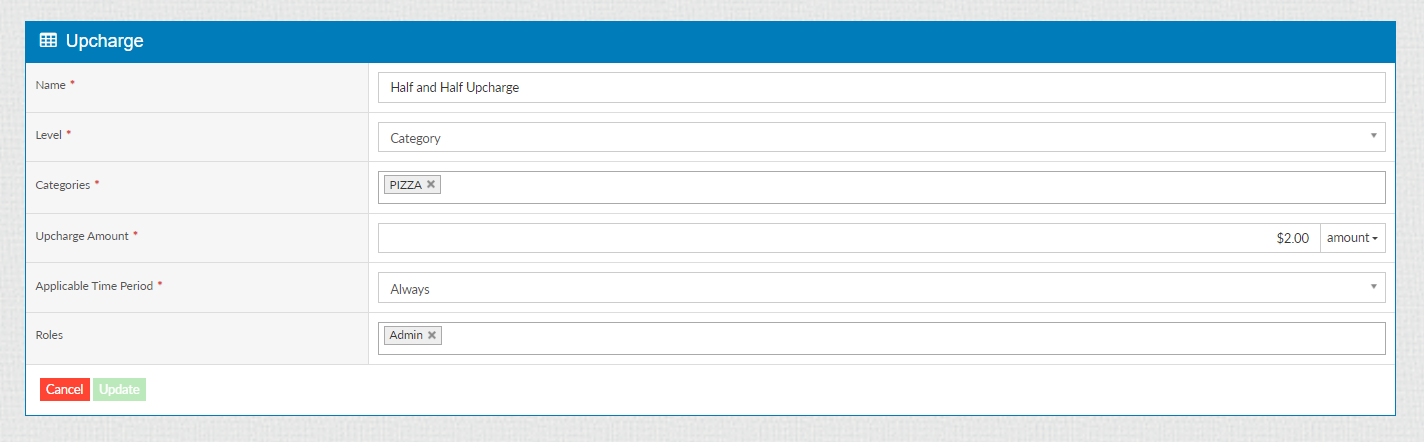
We need the ability to up charge on the serving size also:
Customer support service by UserEcho



